
The debate over BIM software has grown considerably more heated in 2026. As South Korea’s Ministry of Land, Infrastructure and Transport (MOLIT) mandates BIM adoption across all public construction projects worth 50 billion won or more, small and mid-sized design firms and contractors who had been putting off adoption now face software selection and budget decisions as immediate, unavoidable concerns. Some argue that it’s still not too late to move quickly, while others warn—pointing to Autodesk’s rising subscription fees—that jumping in without preparation will only saddle firms with runaway costs. This is not simply a matter of picking one piece of software; it’s a decision that will shape entire project workflows for years to come, and it deserves careful scrutiny.
1. Why 2026 Is a Turning Point: The Mandate Roadmap and Wildly Inconsistent Market Estimates
MOLIT has been signaling its phased BIM mandate roadmap for several years now. Here’s how it breaks down:
- 2023: Rail and building projects worth 100 billion won or more
- 2024: River and port projects worth 100 billion won or more
- 2026: All public construction projects worth 50 billion won or more
- 2028: Public construction projects worth 30 billion won or more
- 2030: Full expansion to public construction projects under 30 billion won
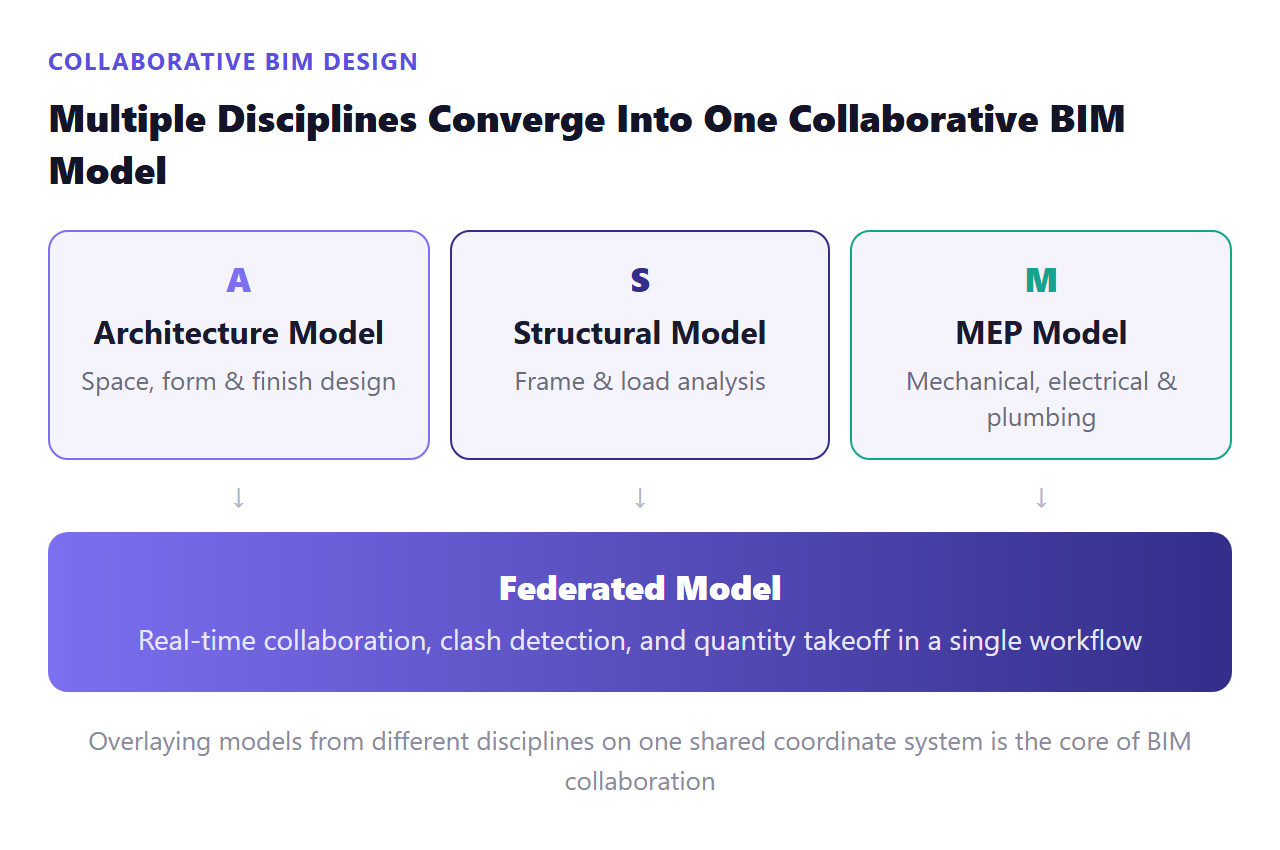
In other words, 2026 marks the first year that BIM mandates—long seen as something that only applied to large-scale projects—genuinely extend into mid-sized public construction work. MOLIT’s “Construction Industry BIM Implementation Guidelines” don’t merely require submission of 3D models (in native or IFC format); they explicitly specify clash detection results between disciplines and 3D-model-based quantity takeoff data as required deliverables. The evaluation bar has shifted from “did you build a model?” to “what did you actually verify with that model?”
The trouble is that even market-size figures vary wildly depending on which research firm you consult. Estimates for the global BIM software market in 2026 range from roughly $20.68 billion (from Fortune Business Insights and similar firms) down to about $11 billion, $11.29 billion, and $10.27 billion—nearly a twofold spread between sources. The discrepancy largely comes down to whether software alone is counted or services are included as well, and projected CAGR figures are similarly split between roughly 13% and a range of 12.9%–16.2%. In other words, it’s more practical to focus on the overall direction—a rapidly growing market—than to fixate on any single number. A survey finding that roughly 57% of construction firms already use BIM software to reduce design errors, improve planning accuracy, and cut project delays shows that this trend is no longer confined to a handful of early adopters.
The core of MOLIT’s BIM implementation guidelines isn’t “submitting a model”—it’s “submitting verifiable data that includes clash detection and quantity takeoff.”
2. Which Architectural Design Authoring Tool Should You Choose: Revit vs. ArchiCAD?
When choosing BIM software for architectural design, the first question everyone runs into is essentially: Revit, or not Revit?
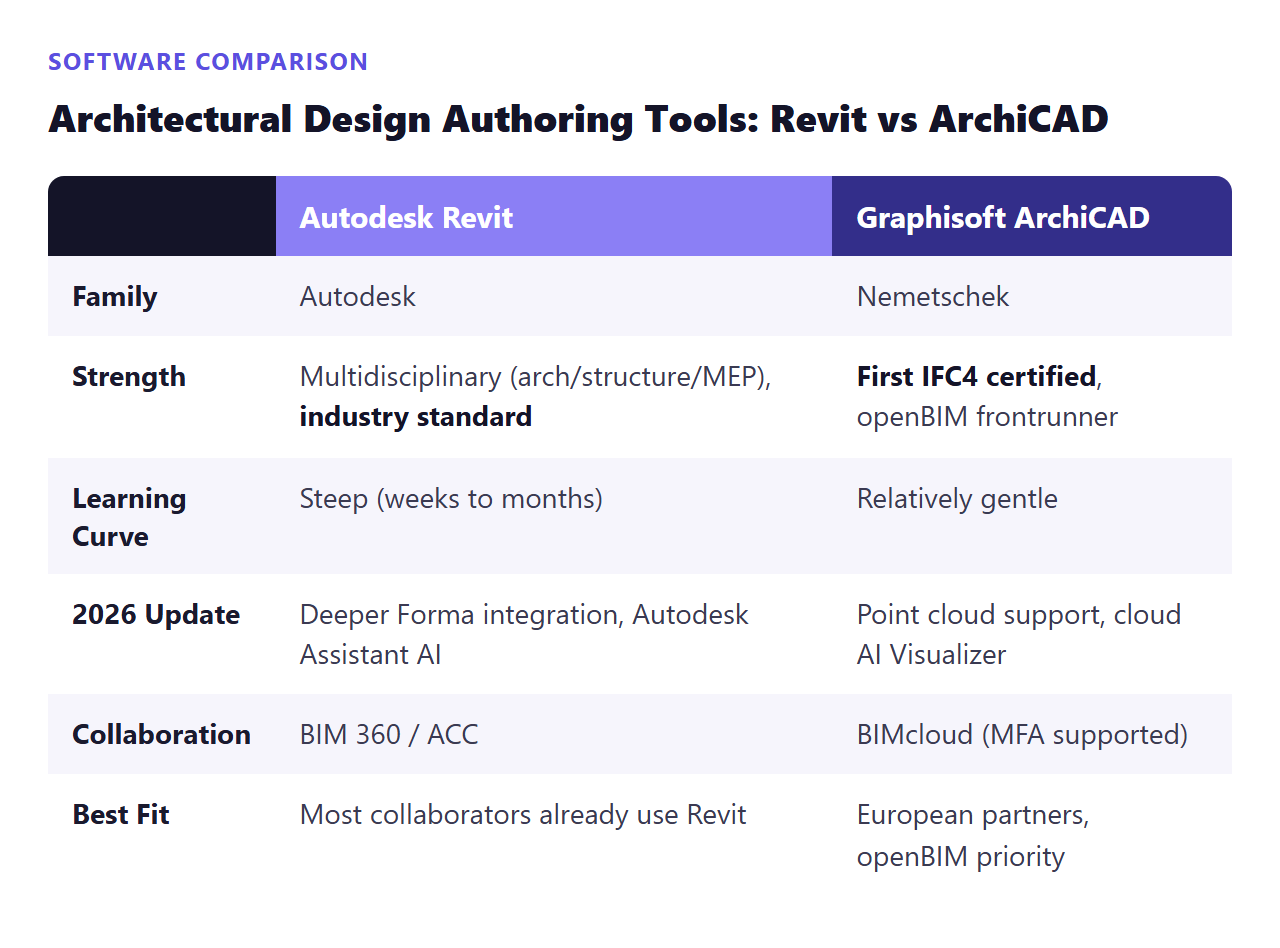
The Case for Autodesk Revit: It’s widely regarded as the most broadly deployed multidisciplinary (architecture, structure, MEP) BIM authoring platform across North America, Europe, and the Middle East. A built-in parametric modeling engine, 4D scheduling, 5D cost simulation, and energy analysis tools have cemented its position as the “industry standard.” Revit 2026 improved graphic representation and element visibility in collaborative models, and AI features are expanding across the board—for instance, Autodesk Assistant is now integrated into Forma Site Design. With Civil 3D folded into Forma as a “Connected Client,” interoperability between Revit and Forma is set to strengthen from early planning through detailed design. That said, its learning curve is on the steep side, often taking anywhere from several weeks to several months to master.
The Case for Graphisoft ArchiCAD: Part of the Nemetschek family, ArchiCAD was among the first to earn buildingSMART’s IFC4 certification, making it a frontrunner in the openBIM camp that treats IFC not as a bolt-on feature but as a first-class format. ArchiCAD 28 introduced point cloud functionality for remodeling projects and a cloud-based AI Visualizer, while its collaboration infrastructure, BIMcloud, added simpler external content-sharing (without complex license configuration) and strengthened multi-factor authentication (MFA).
What matters practically in this rivalry isn’t which platform is absolutely superior—it’s the standard your collaborators use. If every consultant on a project works in Revit, Revit is the sensible choice; if you’re partnering with European firms where openBIM compatibility matters, ArchiCAD or Allplan is the more realistic option. On Mac, Vectorworks Architect—supporting macOS 14/15 and Apple M1-class processors—also comes up as an alternative, offering Parasolid-kernel stability along with 2026 additions like depth cueing and an improved Data Manager. Nemetschek Allplan, strong in German-speaking markets, trades multidisciplinary breadth for depth in architectural and structural modeling, and its 2026 release added freeform stair modeling and support for IDS (Information Delivery Specification).
3. BIM for Structural and Infrastructure Work: How Do Tekla and MicroStation Differ?
There are also tools used more by engineers—structural engineers, steel fabricators, and precast concrete manufacturers—than by architects. Trimble Tekla Structures is recognized as specialized structural detailing and fabrication software with robust IFC support. Tekla Structures 2026 improved numerous concrete and steel components and introduced a new “Multimaterial Detailer Steel/Timber” role, letting concrete-focused and steel-focused teams access each other’s lists and settings. Notably, its Layout Manager workflow automatically flags discrepancies between the design model and as-built field measurements (such as anchor bolt misalignment), allowing corrections before materials reach the site—a genuinely useful feature for reducing construction-phase risk. Trimble has officially stated its 2026 direction as “accelerating BIM, engineering, and construction productivity by streamlining workflows through AI.”
In the infrastructure and civil engineering space, Bentley MicroStation serves as the foundational modeling environment that directly integrates with the Bentley ecosystem—OpenBuildings Designer, OpenRoads, OpenRail, and ProjectWise. MicroStation 2026 upgraded its Python Assistant, which uses the latest AI models to help automate tasks and build custom tools, and also strengthened its geospatial context capabilities. Perhaps most notably, its Export to IFC feature has moved out of technical preview and become a fully commercial feature—a signal that openBIM compatibility is becoming the default, not an option, even in infrastructure BIM.
4. Why You Need Navisworks for Collaboration and Review
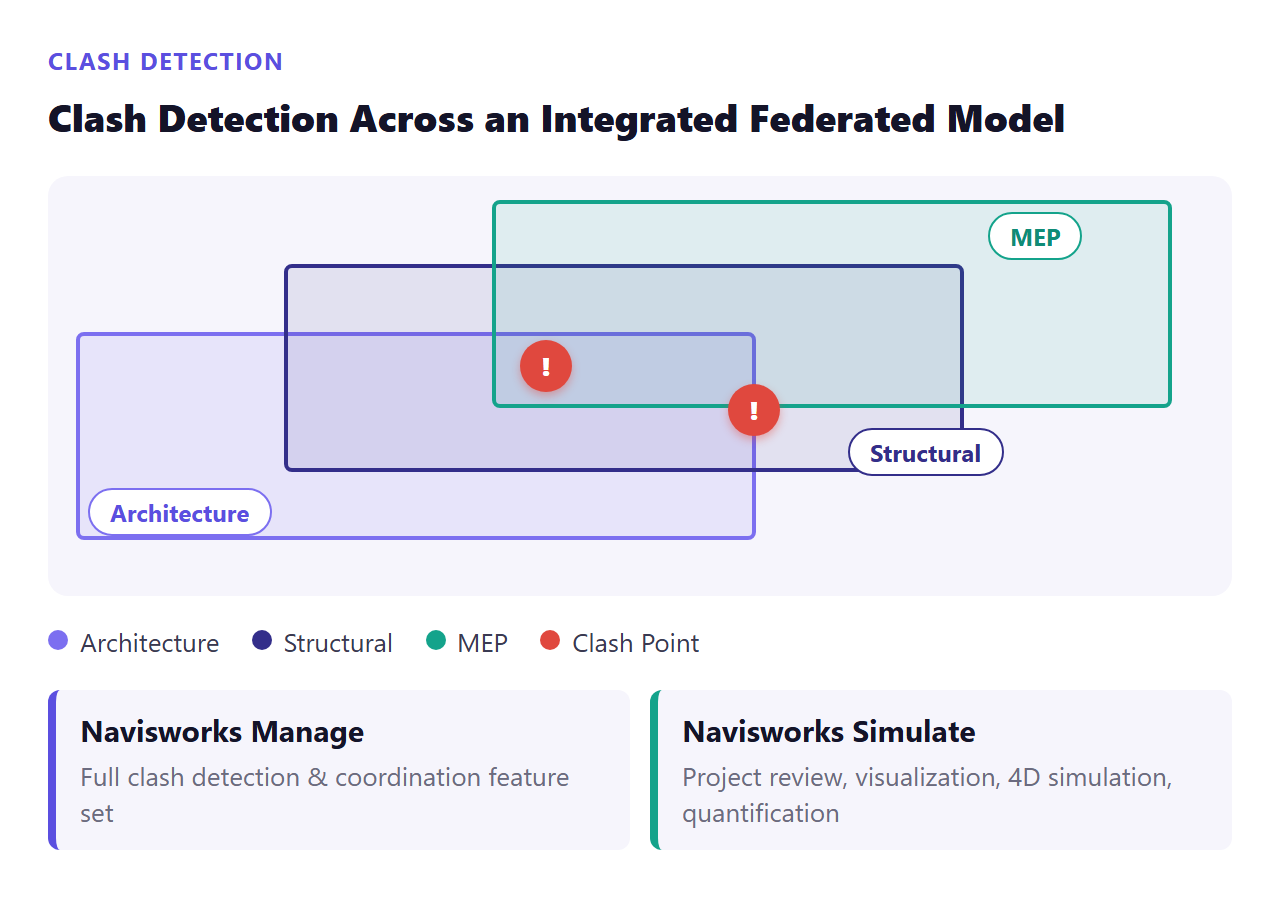
On multidisciplinary commercial projects, the combination that’s become a near-standard is “Autodesk Revit (modeling) + Navisworks (clash detection and coordination).” Navisworks combines project files from multiple disciplines into a single federated model, used for BIM coordination, clash detection, constructability review, 4D/5D simulation, quantity takeoff, and stakeholder communication. It comes in two versions:
- Navisworks Manage: Includes the full set of clash detection and coordination features
- Navisworks Simulate: Provides project review, visualization, 4D simulation, and quantification tools
In other words, no matter how strong your modeling tools are, skipping the step of overlaying multidisciplinary models to catch conflicts in advance makes it hard to avoid problems surfacing only during construction—at which point costs balloon. And given that MOLIT’s implementation guidelines explicitly list clash detection results as a required deliverable, this step is no longer a nice-to-have; it’s something you’re required to submit.
5. Is It Possible Without a Budget? The Open-Source Alternative: Bonsai
Not every organization can afford subscription fees. This is where the free, open-source alternative Bonsai (formerly BlenderBIM) deserves attention. Built on the IfcOpenShell library, it’s a native IFC authoring platform that runs as an add-on for Blender, the open-source 3D modeling tool. Unlike extensions bolted onto general-purpose 3D software after the fact, Bonsai was designed from the ground up to handle genuine IFC-standard BIM workflows, aiming to broadly cover multiple BIM/CAD domains including cost, quantity takeoff, scheduling, and simulation. Because it’s developed and maintained by volunteers, no concrete 2026 roadmap has been clearly confirmed—but its “IFC-native” design philosophy aligns closely with the openBIM movement, making it worth considering for small organizations or for learning purposes.
6. openBIM and IFC: How to Avoid Vendor Lock-In
One issue that must be addressed in any discussion of BIM software is interoperability. Through open standards like IFC (Industry Foundation Classes) and IDS (Information Delivery Specification), buildingSMART provides the foundation for “openBIM”—reducing vendor lock-in, improving data quality, and enabling automation across an asset’s entire lifecycle. IFC is an international standard (ISO 16739-1:2024) designed to be vendor-neutral; IFC 4.0 expanded its scope beyond buildings to civil infrastructure, and IFC 4.3 further added environmental modeling and georeferencing capabilities.
The fact that all the major software covered above—Revit, ArchiCAD, Vectorworks, Allplan, Tekla, Navisworks—supports IFC means that building an openBIM workflow without being tied to a single vendor is realistically achievable. buildingSMART International’s selection of 22 organizations and teams worldwide across seven categories as finalists for the 2026 openBIM Awards is further evidence that collaboration built on open standards is no longer theoretical—it’s translating into real results.
7. The Subscription Price-Hike Trap: License Cost Issues
One of the most frequently overlooked factors when deciding on BIM software is licensing policy. Autodesk products have been subscription-only since 2016, and it has long been a point of controversy that, under this model, expired licenses mean users can’t even reopen their own past work. On top of that, Autodesk’s 2026 renewal notices signaled price increases and reduced discounts, and the industry has been raising concerns about the need for better cost control around network and multi-user licensing.
As an alternative, Autodesk Flex, introduced in 2022, works on a pay-as-you-go model where you purchase tokens that are deducted based on days of use—with different daily deduction rates per program—making it a flexible option for organizations with lower usage frequency. In other words, the question of “which software to use” needs to be considered together with “how to pay for it.” Especially now, as demand for new adoption surges alongside the 2026 expansion of the public-sector BIM mandate, failing to carefully examine licensing policy carries a real risk of saddling your organization with far higher fixed costs than expected.
Closing Thoughts
As we’ve seen, BIM software is no longer just a tool for drawing pretty 3D models—it has become a collaboration platform that connects data across the entire design, construction, and operations lifecycle. With the BIM mandate now expanding to all public construction projects worth 50 billion won or more in 2026, what should take priority over simply picking software that fits your company size or your collaborators isn’t a single choice—it’s weighing IFC-based openBIM readiness together with your licensing cost structure. Whether an organization follows the Revit-centered industry standard, opts for openBIM frontrunners like ArchiCAD or Allplan, or starts by learning on an open-source option like Bonsai may vary case by case. But with rising subscription fees and an expanding mandate roadmap arriving at the same time, delaying preparation is likely to end up costing far more in the long run. Now is the time to examine your software choice and cost strategy together.